Featured

My First Blog Post

Welcome to my tech blog!

Be yourself; Everyone else is already taken.

— Oscar Wilde.

Hello everyone, this is my first time writing in this blog. I’m very excited to launch this site and I hope it’ll give you much insights into my learning during the ICT 2 course. Here are some questions and answers:

What are you willing to learn?
– As this course covers many platforms of social media, I’m open to learn as much as I can about the topic!

Compare your personal strategy to the course objectives.
– I’ll attend to classes as much as I can, and actively ask questions when needed. In the past course I’ve also helped peers, and will be a proactive team member.

What grade would you like to achieve?
– I really enjoy the ICT classes and have excelled in them previously, so I am aiming for the highest grade.

How much work are you prepared to put into the course?
– Each week I’ll use as much time as I need to finish the assignment given. If there is a team assignment, we’ll agree on deadlines and team rules.

In what ways do the course topics interest you?
– I’m especially curious if I can learn new Photoshop features, as I like taking landscape photos with my camera. Hosting a webinar is also very interesting, as I’ve never held one before.

What type of businesses are you interested in?
– Multinational corporations, small but disruptive start-ups and businesses in the field of music industry.

What previous experience do you have about the course content?
– For the Photoshop part, I’ve been on a Photoshop course during senior high school. I also used to have a travel blog when I was a teenager. For video and other photo editing, I’ve made home videos and edited travel photos on iMovie and iPhoto (Apple).

How have your other courses prepared you for this course?
– During Effective Communication course our teacher talked us about the importance of social media, and we learned how to record and edit videos on our phones. Overall, in most of the other courses social media has always been present.


Final Wrapup of the ICT 2 Course

As the sun has started to shine a little bit brighter and the leaves are turning green once again, the school year is also coming to an end. After this spring I will actually be finished with my Haaga-Helia courses and only work placement and thesis are left on my list. Anyways, in this post I wanted to wrap up everything I’ve learned during this ICT 2 course and how I felt about the course.

Sometimes the journey of learning takes you to unexpected places. I thought the topics covered during the course were relatively easy, but I ended up learning a lot more than expected. Diving into the topic of Search Engine Optimization was totally new for me and I feel that part was the most interesting to me. To get to know how the Internet actually works, how everything is linked together and so forth.

When the pandemic hit Finland our course was luckily finished with the contact lessons. Students started preparing for their webinars and my team chose the topic about Fake News. Our webinar went well, we were even able to add polls and a video into the presentation. The content of our presentation could’ve been a little bit more into depth in my opinion. After presenting our topic, I’ve joined in on 10 other webinars and it’s been a joy learning about podcasts, Facebook and Pinterest to name a few.

I wish all my followers a wonderful summer despite the ongoing situation! Remember, you are not alone, we are all experiencing this together. Take care of yourself and stay healthy!

-Elina

Search Engine Optimization

Search engine optimization or SEO is a great way of making sure your website is seen. The main task of this feature is to have your website in the “top 10 rank” of any search engine. Examples of search engines are Google, Yahoo!, Bing, Baidu and Yandex.

The Internet is a web of hyperlinks. These hyperlinks are scanned by bots or spiders. They collect data and categorize them into indexes so anytime a user searches for a keyword, the results are already there. Search engine results page or SERP then shows the most relevant webistes and through complex and unique algorithms it’s even able to jump into your shoes and make accurate guesses of what you’re actually looking for.

The success of SEO is measured in many different ways. Website creators want to collect as much data as possible about their website, as for example:

  • How many visitors does your website have?
  • How many of them are mobile users?
  • What kind of keywords used in your website attract visitors the most?
  • Does your website have local visibility?
  • How well is your website backlinked?
  • What is the average session duration of a visitor?

Keywords

When searching for the right answer, keywords play a significant role. The more relevant and accurate keywords used in website, the better results it has in search engines. This is why content creation with well implemented keywords is vital for the success of the website.

The creator must be able to share educational and informational content instead of spam-like text with every other word using the keywords.

Search engine optimiziation offers great solutions for companies, who want to be seen while maintaining low costs in implementation, collecting data and analytics in realtime and being ahead of their competitors.

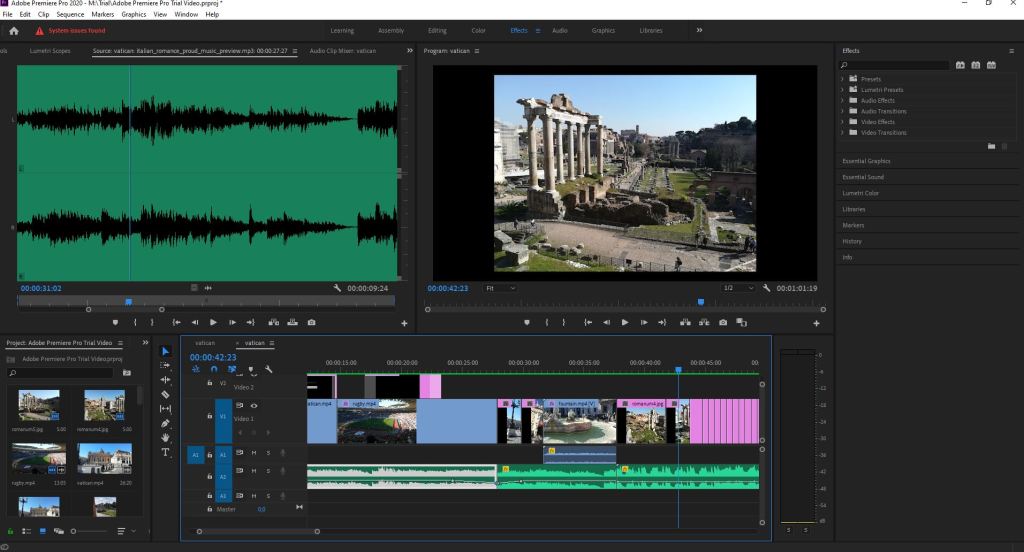
Adobe Premiere Pro 2020

Video editing in Adobe Premiere Pro 2020 is more advanced compared to the PowerPoint video export. The program has features varying from rendering to stabilizing and from adding subtitles to audio editing.

The program is found in the school’s local computers and has significantly more sophisticated features than many other video editing programs. Before this course I had only used PowerPoint and iMovie to create videos.

Did you already check the video I made using the Adobe Premiere Pro 2020? What do you think?

Video Editing on PowerPoint

Adding audio to you PowerPoint with images and video is quick and easy way to create a nice presentation!

I created my PowerPoint presentation about my trip to the Great Wall of China. First I tell a little bit about the history of the Great Wall and then about my experiences visiting the place. I used my own pictures for this PowerPoint and once I was finished with the presentation I saved it as a video and shared it to YouTube.

I had some issues with the music track on the background, so I had to delete it from the final version of the video. If I had the premier version of WordPress I would be able to add the music track on this site.

Adobe PhotoShop 2020

Adobe Photoshop is a raster graphics editor developed and published by Adobe Inc. for Windows and macOS. It was originally created in 1988 by Thomas and John Knoll. Since then, the software has become the industry standard not only in raster graphics editing, but in digital art as a whole.

-Wikipedia

Adobe PhotoShop can be very confusing for someone who hasn’t used the program ever before. There are so many functions, which can make the user feel lost. Luckily there are many tutorials and helpful links that can help you get started!

I chose to use my own images, one from the Great Wall of China and my profile picture. I combined these images, following the instructions given by the teacher, and added greetings and a date. Take a look at the before and after pictures:

LinkedIn Profile

As the world has become digitalized over the past decade, so have most parts of businesses. Negotiations, meetings, conferences and recruitment can happen online and across borders. LinkedIn has had a significant role in this development.

Before starting school I didn’t have much idea on how LinkedIn worked. I updated my work experience there and received notifications whenever someone visited my site. As I started my studies in Haaga-Helia, the importance of LinkedIn has increased rapidly. First I went to get a professional headshot taken at an event in school. Then during my Finnish class we updated relevant information to our profiles and created new CVs. Slowly but steadily I have updated new information to my LinkedIn profile, mostly following the suggested steps the website has for me. By this day, I have 134 connections, 8 profile view over the past 90 days and 8 search appearances over the past week. Take a look yourself!

Creating Site Icon and Logo

Using Windows’ Paint program I created the small icon for my website. The icon should be simple enough, as the picture will be very tiny. I made the letters bold and dark in front of lighter background, so they would be more visible.

The logo was created by using the website FreeLogoDesign. It is a very nice platform with lots of options in different categories such as fashion, health, sports, communication and travel. I chose the inspiration for my logo from the beauty category, as I found the design and colors appealing.

Design a site like this with WordPress.com
Get started